Data Mesh
How to identify Data Products? Welcome “Data Product Flow”
How do we identify Data Products in a Data Mesh environment? Data Product Flow can help you answer that question.
How Witboost orchestrates governance, automation, and release management to accelerate time-to-market of Data Products on the Databricks.
Enterprise data teams using Databricks face a common paradox: the platform gives them extraordinary power to build (Unity Catalog, serverless compute, Databricks Asset Bundles, Genie, Delta Sharing), but as the number of data products grows, coordinating the journey from development to production becomes the bottleneck.
Not because Databricks lacks capability, but because the lifecycle that surrounds it, such as governance checks, metadata enrichment, environment promotion, legal compliance, and release management, requires orchestration that no single tool provides out of the box.
Witboost fills this gap. It sits alongside Databricks as an orchestration and governance layer that coordinates the end-to-end data product lifecycle: from the initial blueprint that scaffolds repositories and workspaces, through iterative development directly in Databricks, to governance validation, environment promotion, and production deployment.
At every step, Witboost leverages Databricks-native capabilities: Asset Bundles, the SDK, Terraform providers, ensuring that teams work with the tools they already know.
This document walks through the complete lifecycle step by step, showing exactly how the two platforms work together and where each one shines.
Building one data product on Databricks is straightforward. Building fifty across multiple teams, geographies, and regulatory contexts is a different problem entirely. organisations consistently hit the same friction points:
Witboost addresses all of these by providing a governance-aware orchestration layer that wraps around, not replaces, the Databricks development experience. The developer still builds in Databricks. With Witboost, they ensure that what gets built can be governed, promoted, and released with confidence.
The following sections describe the complete journey of a data product — from its initial creation to its first production release and beyond. Each step is designed to maximize developer autonomy while ensuring organisational control.
Key Stakeholders: Data Product Team
Where: Witboost
Databricks role: Template source
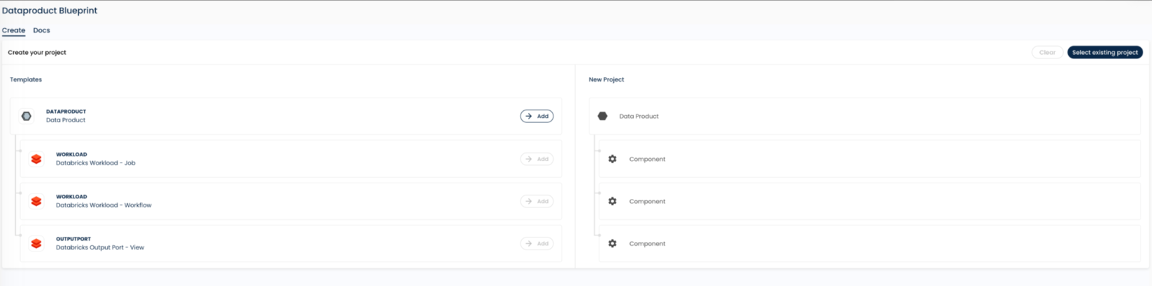
Every data product starts from a blueprint: a pre-configured template that encodes your organisation's standards from day one. When a team member clones a blueprint in Witboost, the platform:
Blueprints are fully customisable. They can leverage Databricks-native technologies such as Databricks Asset Bundles (DABs) — both the predefined ones and custom bundles your platform team has created. The blueprint is where architectural standards become concrete: instead of documenting "every data product must include a Genie space" in a wiki, you encode it directly in the template. It is not only for Infrastructure but also to provide a starting scaffold for the actual code.
Key Stakeholders: Data Product Team
Where: Witboost → Databricks
Databricks role: Target environment
With the blueprint cloned, the team triggers a first deployment to the Databricks Dev environment. At this stage, there are no tables, no Spark jobs, no notebooks. The data product is an empty shell. But it's an empty shell with structure:
Witboost orchestrates this process end-to-end, but the actual provisioning uses Databricks-native automation: Asset Bundles, the Databricks SDK, and Terraform providers. Witboost coordinates; Databricks executes.
Key Stakeholders: Data Engineers / Analysts
Where: Databricks
Witboost role: None (developer autonomy)
Now the real development begins, and it happens entirely within Databricks. The developer experience is unchanged. Teams create and iterate on:
Some of these artifacts, like notebooks, are natively connected to a Git repository, so developers can iterate both from the Databricks UI and from their local IDE. Others, like Unity Catalog table definitions or Genie configurations, are not natively versioned in Git. They live in Databricks.
This is by design. Witboost does not force developers to change how they work in Databricks. The platform respects the Databricks-native workflow and only intervenes when it's time to bring everything together for governance and release management.
Key Stakeholders: Data Product Team
Where: Witboost → Databricks
Databricks role: Source of truth for runtime artifacts
When the team is ready to move toward quality assurance, they return to Witboost and trigger a reverse engineering operation on the Dev environment. This is the critical bridge between free-form development and governed release management.
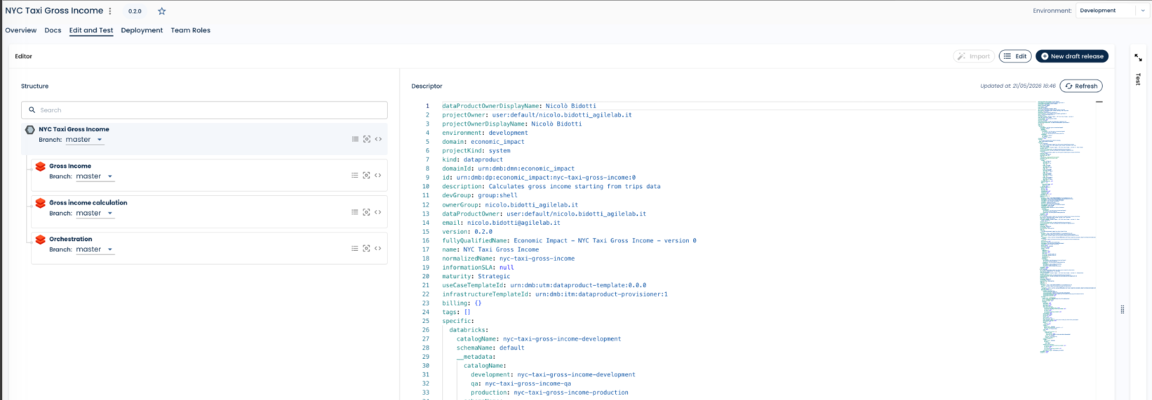
Witboost inspects the Databricks Dev environment and converts all artifacts that are not natively versioned in Git (Unity Catalog table definitions, Genie configurations, access policies, workflow definitions) into declarative descriptors that are committed to Git alongside the notebook code and all other artifacts that were already version-controlled.
The result: a single Git repository that contains the complete, deployable definition of the data product:
Key Stakeholders: Data Product Owner / Steward
Where: Witboost
Databricks role: Indirect beneficiary (Unity Catalog, Genie)
With the technical definition complete, it's time to layer on business context. Witboost provides templates and a user-friendly UI to enrich the data product with business metadata:
All business metadata is saved in the same Git repository, alongside the technical artifacts captured in Step 4. This co-location is intentional: when business metadata lives next to the code, it follows the same versioning and change management process. No more "the catalog says one thing, but the actual table looks different."
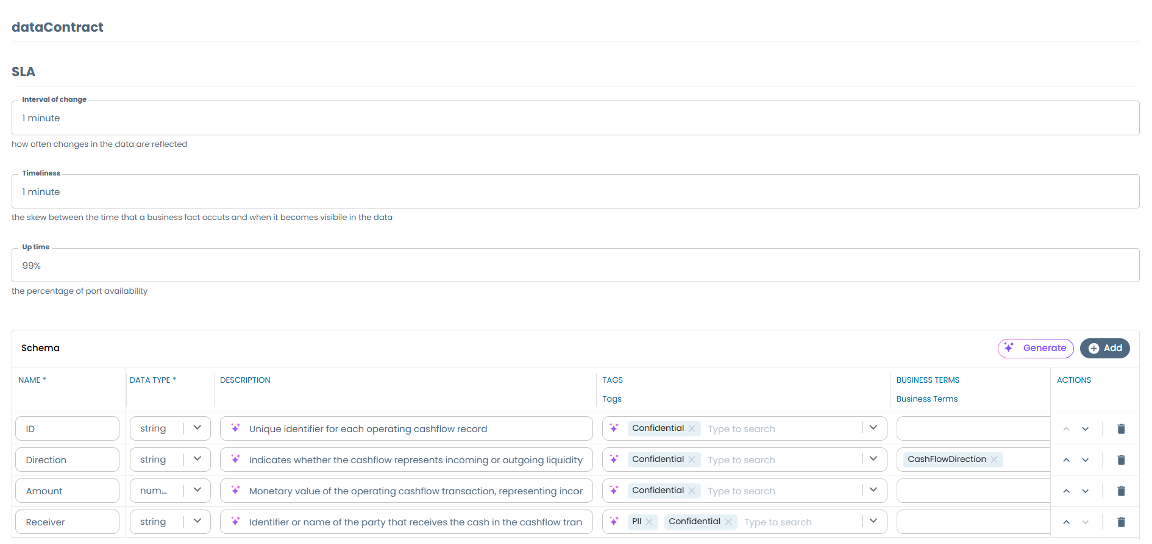
Critically, this business metadata will flow into Unity Catalog and Genie at deployment time (Steps 8 and 11), making Databricks-native discovery and AI-assisted querying more accurate and reliable.
Key Stakeholders: Data Product Team
Where: Witboost → Databricks
Databricks role: Dev environment
Before proceeding to QA, the team deploys the complete data product, now including both technical and business metadata, back to the Dev environment to verify that everything works as expected. This is a full end-to-end test: tables are created, workflows run, Genie is configured, access policies are applied, and data quality rules are validated.
This step catches integration issues early, before they become expensive to fix in downstream environments.
Key Stakeholders: Data Product Team
Where: Witboost
Databricks role: None (governance is platform-agnostic)
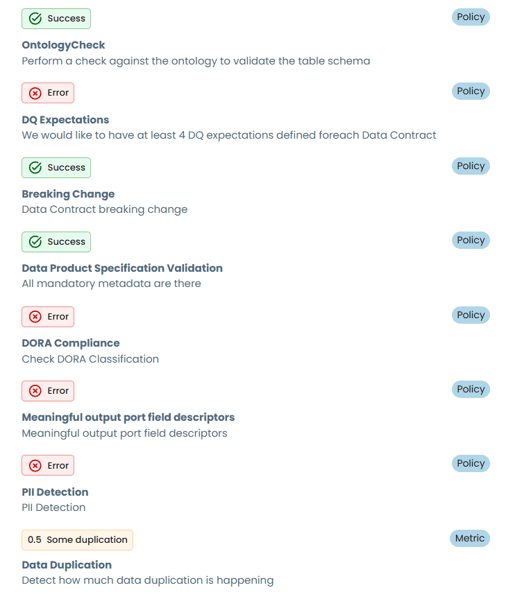
This is where Witboost's computational governance engine comes into play. Before promoting to QA, the team runs a dry run of all applicable governance policies against the data product. These policies are not just documentation in a wiki; they are executable rules that evaluate the data product automatically.
Examples of what computational policies can verify:
|
Policy Category |
What It Checks |
Example |
|
Metadata Completeness |
Business metadata is complete and meaningful |
All data contract fields have descriptions; at least 70% have business terms |
|
Data Contract Integrity |
No breaking changes introduced |
Schema diff against previous version; breaking change rules evaluated |
|
Access Control |
Permissions and masking are configured correctly |
PII fields have row-level filtering tags; access policies match classification |
|
Architectural Compliance |
Data product meets architectural standards |
Must include a Genie space; must expose data via Delta Sharing; DQ rules defined |
|
Regulatory Compliance |
Domain-specific regulations are satisfied |
DORA classification present; backup policy and RTO/RPO declared if critical |
|
Security |
Security posture is correct |
No public access; encryption at rest; audit trail integration for sensitive data |
The team typically validates against both QA and Production policies in a single dry run. This way, they discover any production-readiness gaps early, before investing time in user acceptance testing.
Key Stakeholders: Data Product Team
Where: Witboost → Databricks
Databricks role: QA environment
Once the governance gate is clear, the team freezes the release in Git through Witboost — creating an immutable, versioned snapshot of the complete data product.
Witboost then deploys this release to the QA environment using the same automation that provisioned Dev, but changing all the environment variables. The deployment recreates the entire data product faithfully: workspace, tables, notebooks, workflows, Genie configurations, access policies, everything.
Because business metadata is now part of the release, Unity Catalog in the QA environment is automatically enriched with the complete business context. This has an important downstream effect: Genie becomes more performant and reliable in understanding the data, because it can reference accurate descriptions, business terms, and classification tags.
Key Stakeholders: Business Stakeholders / Legal / Security
Where: Databricks (QA)
Witboost role: Change management if modifications needed
The data product is now in QA and ready for acceptance testing. Business stakeholders validate data quality and behavior, and all the rest about compliance and legal has already been checked by computational policies. All that remains is just a high-level review.
If modifications are needed (metadata corrections, schema adjustments, additional data quality rules), the changes are made through Witboost, committed to Git, and a new release is cut. The updated release can then be redeployed to both Dev and QA with minimal effort, without losing any changes or forgetting to replicate modifications across environments.
Importantly, these operations happen without requiring direct access to the Databricks QA environment. Since QA is a pre-production environment, teams typically don't have administrative privileges there. All changes flow through the automated deployment pipeline.
Key Stakeholders: Data Product Team
Where: Witboost
Databricks role: None
Before requesting production approval, the team runs the computational policies one final time — now targeting the production environment configuration. This catches any remaining gaps: production-specific security requirements, production SLA declarations, or regulatory constraints that don't apply to QA.
Key Stakeholders: Domain Owner / Release Manager
Where: Witboost
Databricks role: None
Witboost supports configurable approval workflows. Before the production deployment is triggered, a formal approval request is sent to the designated authority. This is typically the domain owner or release manager. The approval is tracked, timestamped, and auditable.
This ensures that no data product reaches production without explicit, documented authorisation, which is a requirement in highly regulated industries.
Business Stakeholders: Automated
Where: Witboost → Databricks
Databricks role: Production environment
Once the approval is granted, Witboost deploys the frozen release to the production environment. The deployment is fully automated and uses the same process that created the Dev and QA environments. This guarantees:
At this point, Unity Catalog in production is enriched with the full business metadata, Genie is configured and operational, access policies are applied, and data quality monitoring is active.
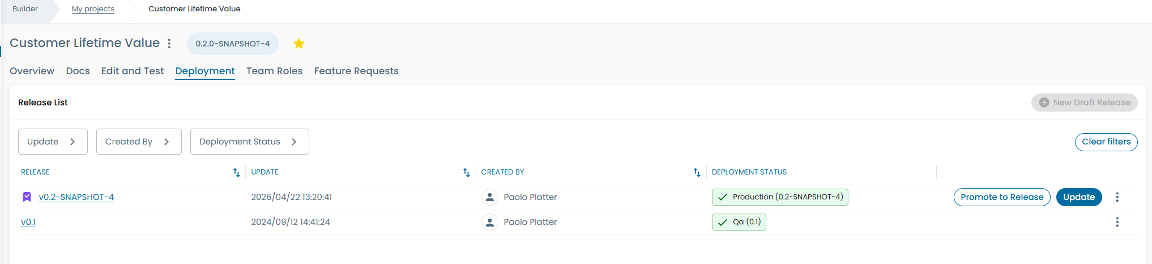
Production deployment is not the end; it's the beginning of the next iteration. When a change request is approved, the team returns to Step 3 (Build in Databricks), and the cycle repeats. Each iteration benefits from the same guardrails, automation, and governance that governed the initial release.
Over time, the library of blueprints grows, computational policies mature, and the organisation develops a compounding advantage: each new data product is faster to build, easier to govern, and cheaper to operate than the last.
A key design principle of the Witboost + Databricks integration is that each platform does what it does best. There is no duplication, no overlap, no friction.
|
Capability |
Databricks |
Witboost |
|
Compute & Storage |
Serverless Spark, Delta Lake, Unity Catalog |
— |
|
Data Development |
Notebooks, SQL Editor, DLT, Genie |
— |
|
Infrastructure as Code |
Asset Bundles, Terraform Provider, SDK |
Orchestrates DABs/Terraform for consistent provisioning |
|
Data Catalog |
Unity Catalog (technical metadata) |
Enriches Unity Catalog with business metadata and data contracts |
|
AI-Assisted Discovery |
Genie (natural language queries) |
Feeds Genie with structured, validated business context |
|
Collaboration |
Delta Sharing |
Defines Delta Sharing as part of the architectural blueprint |
|
Access Control |
Unity Catalog permissions, row/column filtering |
Validates access policies as computational governance rules |
|
Blueprints & Templates |
Asset Bundles (predefined & custom) |
Wraps DABs into organisational blueprints with guardrails |
|
Governance |
— |
Computational policies, shift-left validation, approval workflows |
|
Release Management |
— |
Versioned releases, environment promotion, rollback |
|
Reverse Engineering |
— |
Captures non-Git artifacts as code for unified lifecycle |
|
Business Metadata |
— |
Data contracts, business terms, classification, SLAs |
One of the most common questions we get is: "Who needs to interact with Witboost, and how often?" The answer is clear — most of the time, developers work in Databricks. Witboost is used at specific lifecycle moments.
|
Lifecycle Phase |
Primary Tool |
Who |
Frequency |
|
Clone Blueprint |
Witboost |
Data Product Team |
Once per data product |
|
First Deploy to Dev |
Witboost |
Data Product Team |
Once per data product |
|
Development |
Databricks |
Data Engineers / Analysts |
Daily (weeks/months) |
|
Reverse Engineer to Git |
Witboost |
Data Product Team |
Once per release cycle |
|
Business Metadata |
Witboost |
Product Owner / Steward |
Once per release cycle |
|
Validate in Dev |
Witboost → Databricks |
Data Product Team |
As needed |
|
Governance Dry Run |
Witboost |
Data Product Team |
Once per release cycle |
|
Deploy to QA |
Witboost → Databricks |
Automated |
Once per release |
|
UAT |
Databricks (QA) |
Business Stakeholders |
Per release |
|
Production Approval |
Witboost |
Domain Owner |
Once per release |
|
Deploy to Prod |
Witboost → Databricks |
Automated |
Once per release |
The pattern is clear: developers spend the vast majority of their time in Databricks. Witboost is used at key lifecycle transitions (blueprint, reverse engineering, governance, deployment), and each interaction is short, focused, and adds clear value.
How do we identify Data Products in a Data Mesh environment? Data Product Flow can help you answer that question.
Why 10 successful data products don't prove your model works — and what the lifecycle has to do with it
Data product management helps organisations deliver data products that are usable, governed, and maintainable by defining a clear lifecycle and...